
Email or Whatsapp us:
Customer IPTV Setup Information needed:
- Full Name – (for account reference)
- Email Address – (where login details will be sent)
- Desired Username – (choose a preferred username for your account)
- Preferred Device(s) – (e.g., Android TV, Fire Stick, Smart TV, iOS, MAG Box, Windows, Mac, Enigma, etc.)
- App/Player You Will Use – (e.g., IPTV Smarters, TiviMate, GSE, Smart STB, XCIPTV, etc.)
- MAC Address (if required) – (only for certain apps or MAG/Enigma devices; usually found in app settings or on-screen info)
- Channels Preference – (all channels OR specific category like sports, movies, international, kids, etc.)
- Adult Content (Yes / No) – (please confirm if you want adult channels included in your account)
- Country / Region – (helps us assign the best server and provide relevant channels)
- Time Zone – (optional, useful for EPG accuracy)
 Important Notes for Customers:
- Double-check your details before sending.
- Setup instructions and login details will be sent to your email/whatsapp once your account is activated.
Welcome to our easy-to-follow installation guide for our IPTV app. Whether you’re using a Fire TV, Firestick or an Android Box, you can quickly and safely install our premium IPTV app using the Downloader application.
Before You Begin
Ensure your Firestick or Android Box has a stable internet connection and the Downloader app installed. If you don’t have Downloader yet, you can install it directly from the Amazon App Store (for Fire TV and Firestick) or Google Play Store (for Android Box).
Step-by-Step Guide for Fire TV, Firestick and Android Box
Step 1: Enable ‘Apps from Unknown Sources’
Fire TV/Firestick Users:
Go to Settings > My Fire TV > Developer Options.
Select Apps from Unknown Sources and turn it ON.
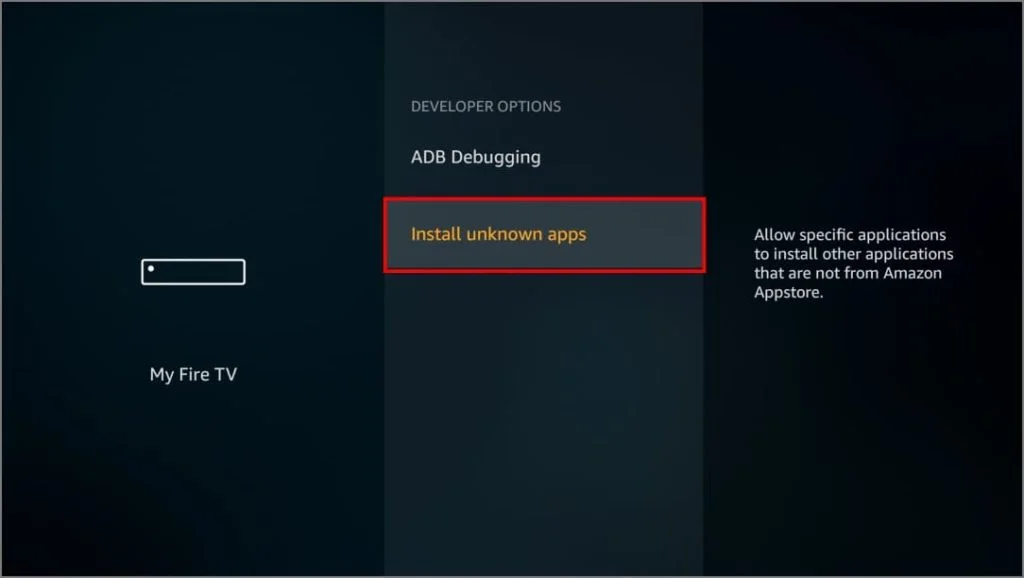
Android Box Users:
Navigate to Settings > Security & Restrictions.
Enable Unknown Sources.
Step 2: Open Downloader App
Launch the Downloader app on your device.
Step 3: Enter our IPTV App Short Code :
In the Downloader app, you’ll see a URL box.
Enter the direct download Short provided to you for our app.
(Typically provided after subscription,(1290136).
Click GO.
Step 4: Download and Install the App
Wait for the download to finish. After the download completes, the installation prompt will appear.
Select Install.
Wait for the app to install fully, then click Done.
Step 5: Launch Our App
You can now open our app directly or find it in your apps list on your Firestick or Android Box home screen.
Final Steps
Open the app, log in with your provided credentials, and start enjoying premium IPTV channels, movies, series, and much more without buffering issues. Congratulations! You’ve successfully installed Our IPTV 4K Player app on your fire TV.